
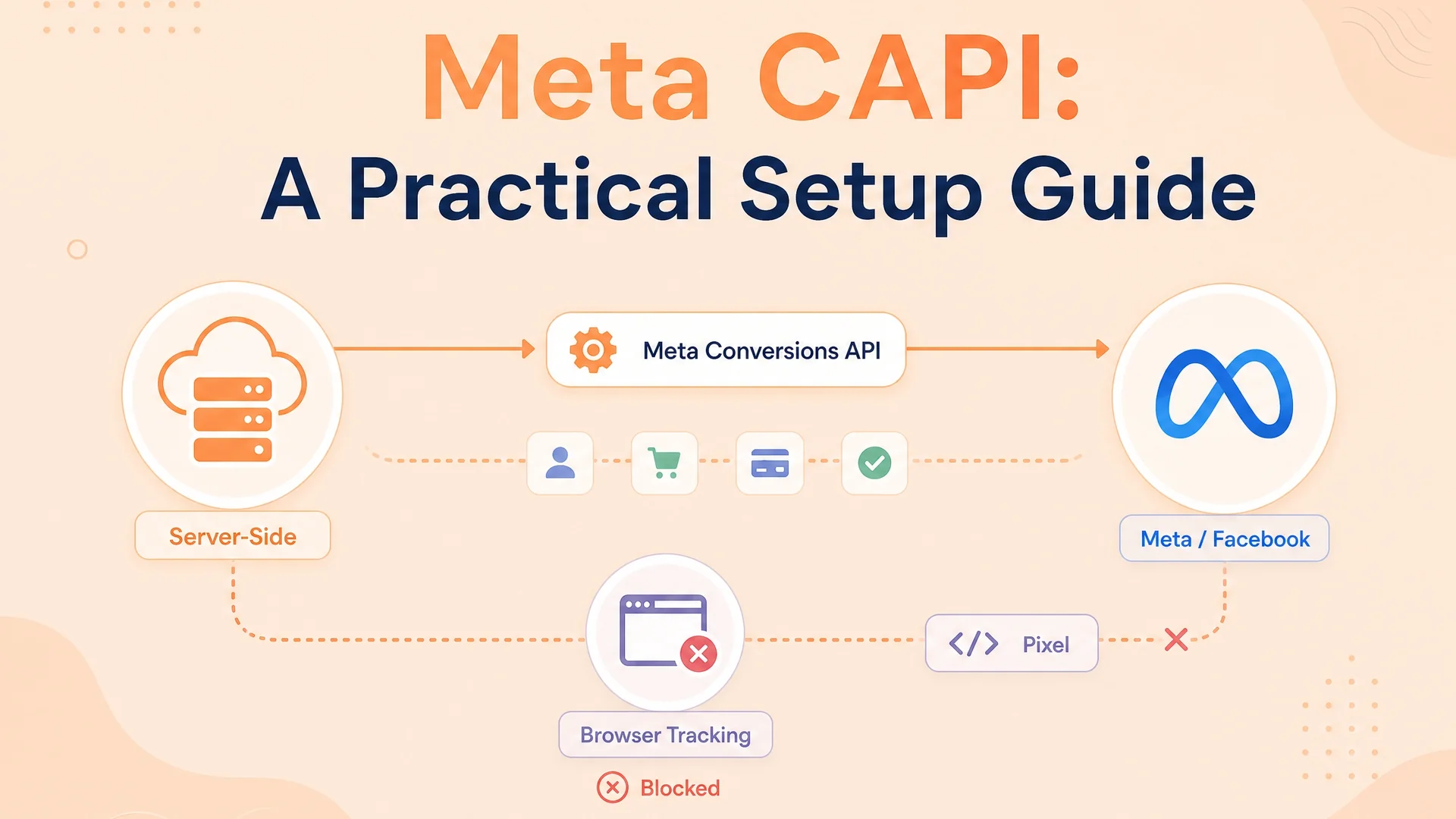
Meta's Conversions API — also called the Facebook Conversions API or Facebook CAPI — sends conversion events from your server to Meta instead of relying on browser tracking alone. When someone fills your form on Safari with an ad blocker, your Meta Pixel might not fire. CAPI catches that event from your backend and sends it anyway.
A pixel working alone captures about sixty-five percent of conversions. Pixel plus CAPI together recover about ninety-five percent. That thirty-point gap is where your optimisation lives.
| Meta Pixel | Conversions API | |
|---|---|---|
| Where it fires | Browser | Your server |
| What it needs | JavaScript running | CAPI token + identifier |
| What blocks it | iOS, Safari, ad blockers, cookies | Nothing |
| Conversion recovery | ~65% | ~95% (with pixel) |
This guide is written for lead-generation advertisers: people running Meta lead ads (instant forms) or website forms who need to send QualifiedLead, Schedule, Purchase and offline events back to Meta so the algorithm optimises for real revenue, not just form submits.
Here is how that chain plays out in practice.
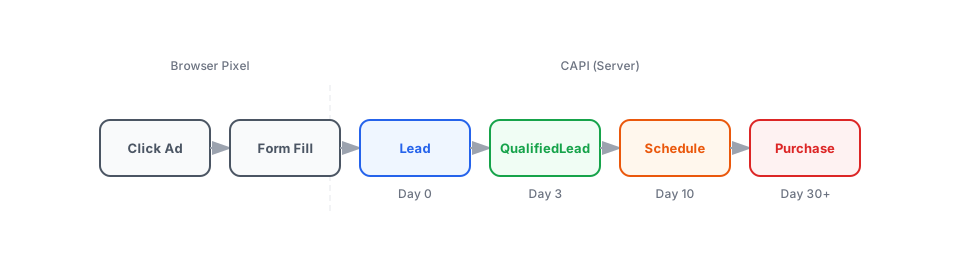
Someone clicks your ad and fills your form. The pixel fires Lead. Three days later you mark them qualified. You send Meta QualifiedLead. A week later they book a meeting. You send Schedule. Eventually they sign. You send Purchase. Meta now knows the full journey from click to revenue.
You do not need a CRM to do this. You need a place where you track what happens after the form fill, and a way to send it to Meta.
What you need before you start
A Meta Pixel configured in Events Manager. Meta calls this a "Dataset" in parts of the interface. The Pixel ID and Dataset ID are the same thing.
A CAPI access token from Events Manager. Go to your Pixel → Settings → Conversions API → Generate Access Token. This is a long-lived token specific to one pixel. Do not confuse it with a Marketing API token.
A way to detect outcomes and send them to Meta. This can be a Google Sheet with Apps Script, a Zapier flow, a webhook from your form tool, or a simple POST from your website backend. What matters is detecting the outcome, mapping it to Meta's standard event name, SHA-256 hashing the identifier, and sending it.
An event_id for deduplication. When the pixel fires
Leadin the browser and your backend sendsLeadthrough CAPI for the same submission, Meta needs to know they are the same event. Send the sameevent_idin both places.
Three ways to set it up without a CRM
Path 1: Google Sheets + Apps Script
Best for no-code teams and small budgets.
Set up a sheet with one row per lead. Add columns for email, phone, stage, and timestamp. Write an Apps Script that triggers when a stage cell changes. In the script, SHA-256 hash the email and phone, build the CAPI payload, and POST it to Meta's endpoint.
The effort is medium but you control every step. Match rate is high because you can capture the fbclid from your landing page URL and format it correctly.
Path 2: Zapier or Make
Best if you already use automation tools.
Trigger on a new row in your spreadsheet or a new record in your database. Use a code step to format the payload — you still need to SHA-256 hash the identifiers yourself, since most no-code tools do not do this automatically. Then send to Meta's CAPI endpoint via a webhook action.
The effort is low but match rate can be medium if you do not hash identifiers or miss the fbclid.
Path 3: Website backend
Best if you have a developer.
Capture form submissions in your backend. Store the lead data. When the stage changes — via an admin action, a webhook, or a scheduled job — build the CAPI payload with full control over hashing, identifiers, and timing. Send via HTTPS POST.
The effort is higher but you get full control over match rate and can implement retry logic for failed requests.
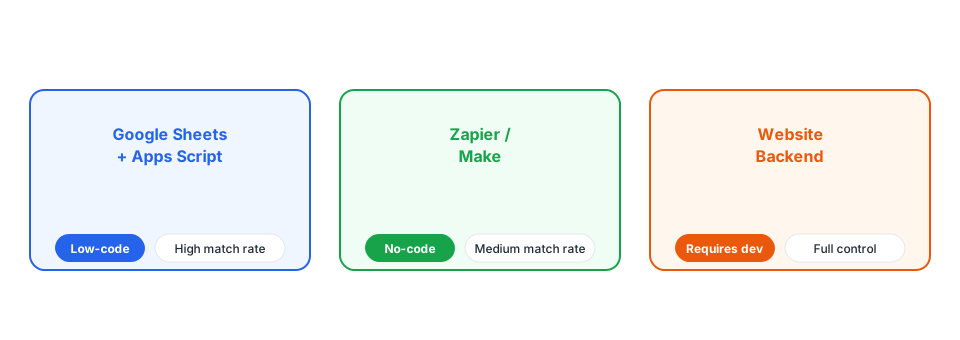
The point is not which tool you use. The point is that you track the outcome and send it.
Meta Standard Events for Lead Generation
Meta recognises exactly seventeen standard event names. These are the only names the algorithm understands out of the box. Use them exactly as written, case and all. Lead-generation teams usually call this list the Facebook standard events or Meta standard events.
Lead · QualifiedLead · Schedule · StartTrial · Purchase · AddPaymentInfo · AddToCart · AddToWishlist · CompleteRegistration · Contact · CustomizeProduct · Donate · FindLocation · InitiateCheckout · Search · SubmitApplication · Subscribe · ViewContent
For most lead-generation funnels, you only need the first five. Here is the mapping.
| Your stage | Send this event name |
|---|---|
| New inquiry / form submission | Lead |
| Marketing qualified lead | QualifiedLead |
| Sales qualified / meeting booked | Schedule |
| Opportunity / proposal sent | StartTrial |
| Customer / deal closed | Purchase |
Schedule is Meta's name for a booked meeting. StartTrial is Meta's name for an opportunity. These are not names the ecosystem invented — they are what HubSpot, Salesforce, and every other integration maps to behind the scenes.
Send the event name exactly as shown. QualifiedLead works. Qualified does not. Meta will accept Qualified but the algorithm has no built-in understanding of what it means, and it cannot be used as an optimisation target for Conversion Leads campaigns.
Meta CAPI for Lead Ads and Instant Forms
Website forms
Someone clicks your ad, lands on your site, fills your form. The pixel fires Lead automatically. You later send QualifiedLead, Schedule, and Purchase through CAPI as the lead progresses.
- Best identifier: The
fbclidparameter in your landing page URL. Wrap it into anfbccookie and send it with every CAPI event. Match rate is near perfect when present. - Fallback: SHA-256 hashed email + phone. Gets you to eighty percent or better.
- Action source:
websitefor the initial Lead event (to match the pixel),system_generatedfor stage events.
Meta Lead Ads (instant forms)
Someone clicks your ad, a native form opens inside Facebook or Instagram, they fill it without visiting your site. Meta stores the lead and counts it in Ads Manager. No pixel fires. No browser session. No UTM parameters.
The lead count in Ads Manager is not a CAPI event. It is internal tracking because Meta owns the form. If you want the algorithm to learn what those leads turned into — qualified, junk, customer — you have to send those events yourself.
- Best identifier: The fifteen-digit
leadgen_idMeta assigns to every instant form submission. If you capture it and send it back through CAPI, match rate is ninety-five percent or better. Meta already knows exactly which lead you are talking about. - Without it: Email and phone alone give fifty to sixty-five percent match rate. That gap is the difference between CAPI being a meaningful feedback loop and expensive decoration the algorithm half-trusts.
- Action source:
system_generatedfor all events, since there is no browser session.
Offline Conversion Tracking with Meta CAPI
Offline conversion tracking is how you tell Meta what happened after a lead entered your world — a call, a meeting, a signed proposal, or a disqualification. For most lead-gen teams this is the whole point of CAPI.
When a website form or instant form becomes a qualified lead, schedule or customer, send that outcome as a CAPI event with the same identifier (email/phone or leadgen_id) you captured at the point of submission. Meta then links the offline outcome back to the original ad click.
Lookback window
Meta accepts events up to sixty-two days in the past for offline events with action_source: physical_store. For website forms and instant forms, the limit is seven days. Events older than seven days are rejected with error subcode 2804003.
If you are turning CAPI on for the first time, send events in close to real time from day one. Do not plan to backfill last quarter's leads.
Test your events before going live
Meta provides a test event code in Events Manager for every pixel. It looks like TEST12345. Send your events with test_event_code in the payload and they appear in a dedicated test panel instead of your production data.
Use the test panel to check three things:
- The event name matches one of Meta's seventeen standard names.
- The
event_idis identical between your pixel event and your CAPI event for the same action. - Meta predicts a strong match to a Facebook profile. If the match looks weak, add more identifiers. Email and phone are the highest-impact fields you control.
A test event code takes thirty seconds to generate and saves hours of debugging silent failures.
Getting the most out of CAPI once it is running
Most teams set up CAPI, keep running campaigns the same way, and wonder why nothing improved. Here is how to capture the benefit.
Optimise on the right event. Meta's algorithm needs about fifty conversion events per ad set per week to exit learning and bid efficiently. Start with Lead if you need volume. Once you have fifty QualifiedLead events per week per ad set, switch to that. Once you have fifty Schedule events, switch to that. Do not rush it.
Send value with every event. A raw lead might be worth a hundred rupees. A qualified lead might be worth fifty thousand. The ratio matters more than the exact number. Once values flow, switch from lowest cost to highest value. Now Meta is trying to get you more valuable leads, not just more leads.
Build a junk lookalike and exclude it. Take your last ninety days of disqualified leads. Upload them as a custom audience. Build a one to five percent lookalike. Exclude it in your ad sets. Meta proactively avoids people who look like your bad leads.
Configure the Sales Funnel in Events Manager. After seven days of production data and at least two hundred leads per month, a Sales Funnel panel unlocks. Categorise each event as positive stage or "other" stage. Order positive stages from top to bottom. This tells Meta's algorithm which events represent progress and which represent failure.
How to Improve Event Match Quality
Meta scores every CAPI event zero to ten based on Facebook user match. Six is okay. Eight or above is great. To hit eight, send clean email and phone in every event, plus IP and user agent. Email alone is worth up to four points. Phone is worth about three.
The hierarchy of identifiers matters. A leadgen_id from an instant form is nearly exact. A fbc cookie ID is strong if fresh. Email and phone are good. IP and user agent help. Send as many as you have, in every event.
A strong Event Match Quality (EMQ) is the difference between CAPI being a reliable signal and expensive decoration the algorithm half-trusts. Review it in Events Manager weekly for the first month, then monthly.
Frequently asked questions
What is Meta Conversions API (CAPI)?
Meta Conversions API, also called Facebook CAPI, is a server-side tracking tool that sends conversion events from your backend to Meta instead of relying only on the browser pixel.
What are Meta standard events for lead generation?
The most useful Meta standard events for lead funnels are Lead, QualifiedLead, Schedule, StartTrial and Purchase. Send them exactly as written so Meta can optimise campaigns on each outcome.
How do you track Meta lead ads with CAPI?
Capture the fifteen-digit leadgen_id from each instant form submission, then send QualifiedLead, Schedule or Purchase events back through CAPI with that ID or a SHA-256 hashed email and phone.
What is offline conversion tracking in Meta CAPI?
Offline conversion tracking sends outcomes that happen outside the browser — calls, meetings, deals closed — back to Meta as CAPI events so the algorithm learns which ads produced real revenue.
How do you improve Event Match Quality (EMQ) in Meta CAPI?
Send clean email and phone on every event, plus IP and user agent. For instant forms, include the leadgen_id. Aim for an EMQ score of 8 or above.
Checklist before you go live
| Check | Why it matters | How to verify |
|---|---|---|
| Event names are Meta's standard list | Custom names are accepted but not optimisable | Test Events panel shows Lead, QualifiedLead, etc. |
leadgen_id captured for instant forms | Without it, match rate drops to 50-65% | Check your sheet or webhook payload |
| Events sent within 7 days | Web events older than 7 days are rejected | Send in real time, do not batch old data |
value and currency on stage events | Without value, algorithm optimises for volume | Check payload includes both fields |
event_id shared between pixel and CAPI | Prevents double-counting conversions | Same string in both places |
Related guides
- Google Analytics 4 + Tag Manager: Enhanced Conversions Setup
- Google Ads Data Manager API: The Migration Nobody Warned You About
- The Real Guide to Accurate Conversion Tracking
Get these right and CAPI becomes one of the highest-ROI pieces of infrastructure in your marketing stack.

Written by
Dan Antony
I have spent 11 years building marketing teams and infrastructure from scratch — from a $1.5M B2B SaaS budget to leading two brands across India and Singapore. I write about Meta Ads, Google Ads, SEO, and the MarTech stack that actually moves the needle.