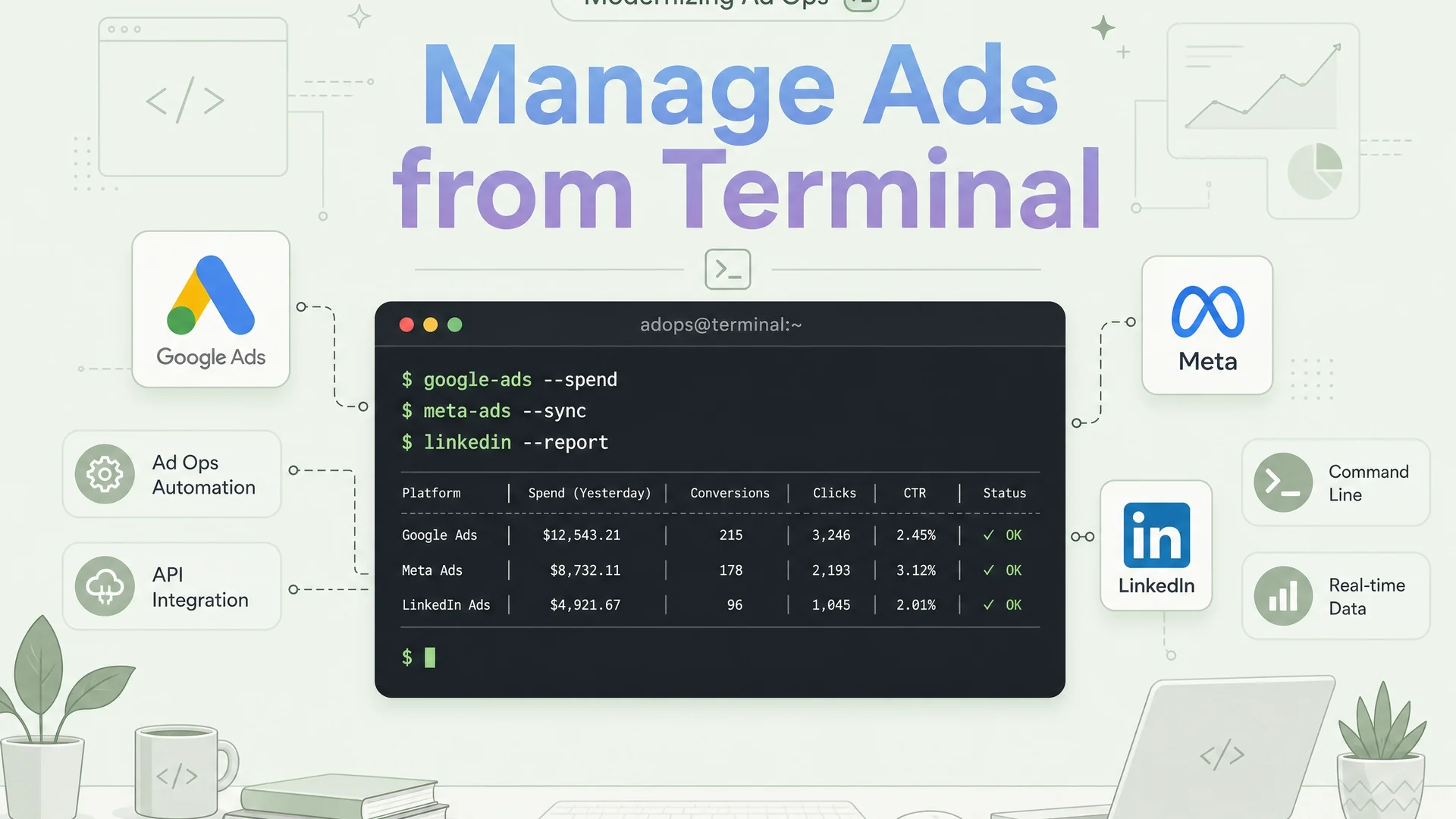
I used to live inside the Google Ads interface. Tabs open across two monitors, the campaign view on one, the change history on another, a Google Sheet half filled with numbers I had copied by hand. For years that felt like the job. It was not. It was the part of the job that was stopping me from doing the job.
This is the honest account of how I moved almost everything I do, campaign checks, reporting, conversion uploads, lead qualification, into commands I run from a terminal, and what that actually changed. Not the version where everything is clean. The real one, with the bugs.
There is a second story under that one, and it is the one that actually matters. When I started, there was no tool for this. No official connector for Google Ads, none for Meta, none for LinkedIn, nothing I could install that would let a capable assistant work a live ad account the way I needed. So I built it. Not a script here and there, a working layer that puts all three platforms, the CRM and the reporting behind a single plain language prompt, with my judgement still in the loop. I did not wait for the platforms to ship this. I built it first, and it has run real budgets every day since.
The moment the interface stopped scaling
The breaking point was not a big dramatic failure. It was a Tuesday. I was running performance marketing across two brands in two countries, India and Singapore, different currencies, different time zones, the same underlying need: know what happened yesterday, know what it cost, know which leads were real.
To answer that I was opening the Ads UI, changing the date range, exporting, pasting into Sheets, then doing the same for the other account, then reconciling the two by eye. Every single day. By the time the numbers were in front of me the day was a third gone, and the numbers were already a snapshot of something I could no longer change.
The interface is built for one account, one session, one human looking at one screen. The moment your reality is many accounts, repeated daily, cross checked against a CRM, the interface is no longer a tool. It is a tax you pay every morning. I decided to stop paying it.
So I built the layer that did not exist
The first move was unglamorous. Stop using the interface to read data and start asking the APIs directly, then keep the logic in a git repo instead of trapped in a vendor's website. Once the data is an API call and the logic is in version control, the terminal stops being somewhere you visit and becomes where the work lives. git log is the change history the Ads UI never honestly gives you. grep searches every automation I have ever written. A diff is the review.
On top of that sit a few small pieces I had to build and keep alive myself, because nothing off the shelf knew my accounts, my sheets, my pipelines or my definition of a qualified lead. One helper reads and writes Sheets, Drive and Docs as me, on a durable user token that does not silently expire, not a service account wrapped in per file shares and not a personal login I re grant on every document. Another runs any Apps Script function straight from the command line, against the code I actually pushed rather than some stale deployment. The Apps Script logic syncs down and back up through clasp, so even the cloud code is just files in the repo.
None of that is the interesting part. It is plumbing, and I am compressing it on purpose. The interesting part is what it added up to: one bridge, end to end, across three ad platforms and the CRM behind them, in production on live budgets across two brands in two countries. The point of this post is not the plumbing. It is what becomes possible the moment a layer like this exists and it is yours.
What it unlocks is not a feature. It is scope.
The change is not that one task got faster. It is that the set of things I can do by asking went from a short list to an open one.
I do not open Google Ads, Meta, LinkedIn or any dashboard to find out how things are going. I ask, in plain language, in the terminal. Pull yesterday's spend across all three platforms and flag anything that moved more than fifteen percent. Which cities are underpacing. Every lead last week that qualified and never got a follow up. Build a customer match list from the closed deals this quarter. Why did cost per lead jump on Thursday. None of those is a saved report or a syntax. They are sentences, and what comes back is the answer, already reconciled against the CRM and my own rules, not a link to something I then go and read.
The plainest version of that is just asking for the money. "Account spend by month since October, with clicks and conversions." A table comes back, in the terminal, in rupees, in seconds.
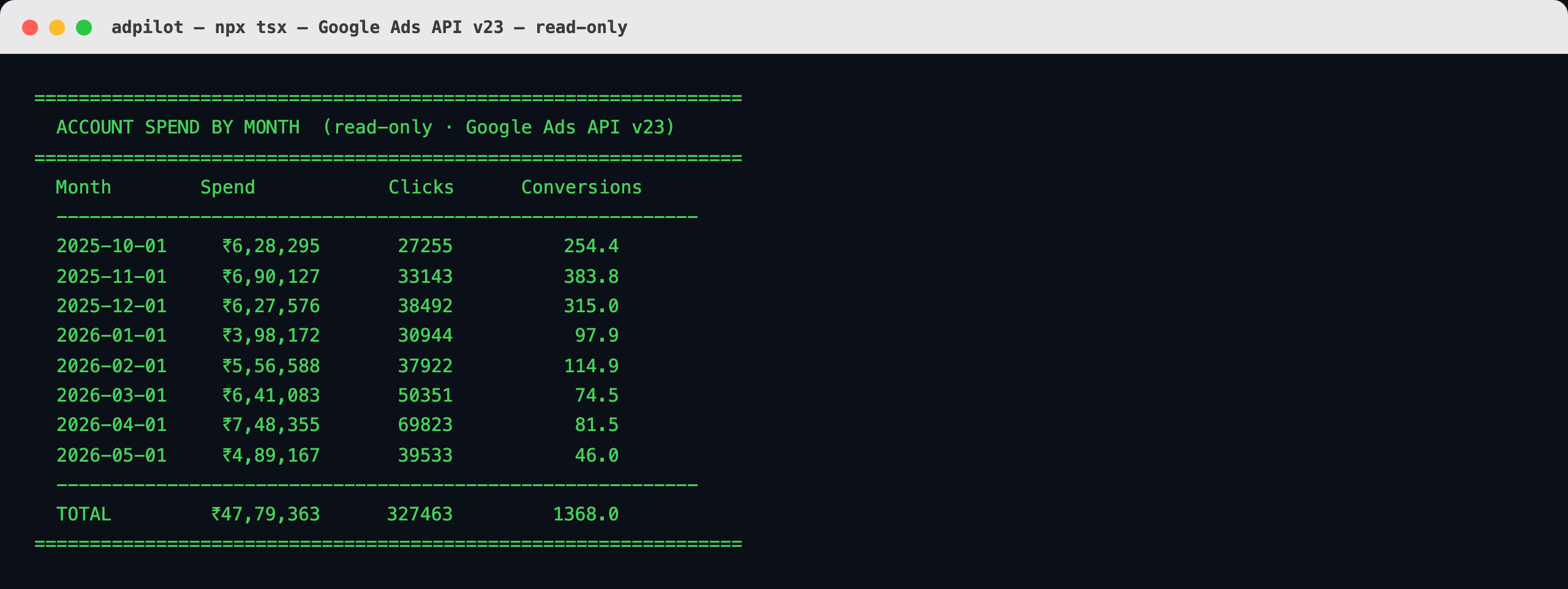
A real read straight off the live Google Ads API. Eight months of account spend, totalled in one sentence. Nothing here is sensitive, so nothing is blurred.
It does not stop at totals. A harder ask: where is the account bidding against itself. It pulled thirty days of search terms and lined up every query that a city brand campaign and the pan-India brand campaign were both paying for, then rolled it up by city. In Bangalore more than half the city's brand intent was being caught by the national campaign, paid for twice.
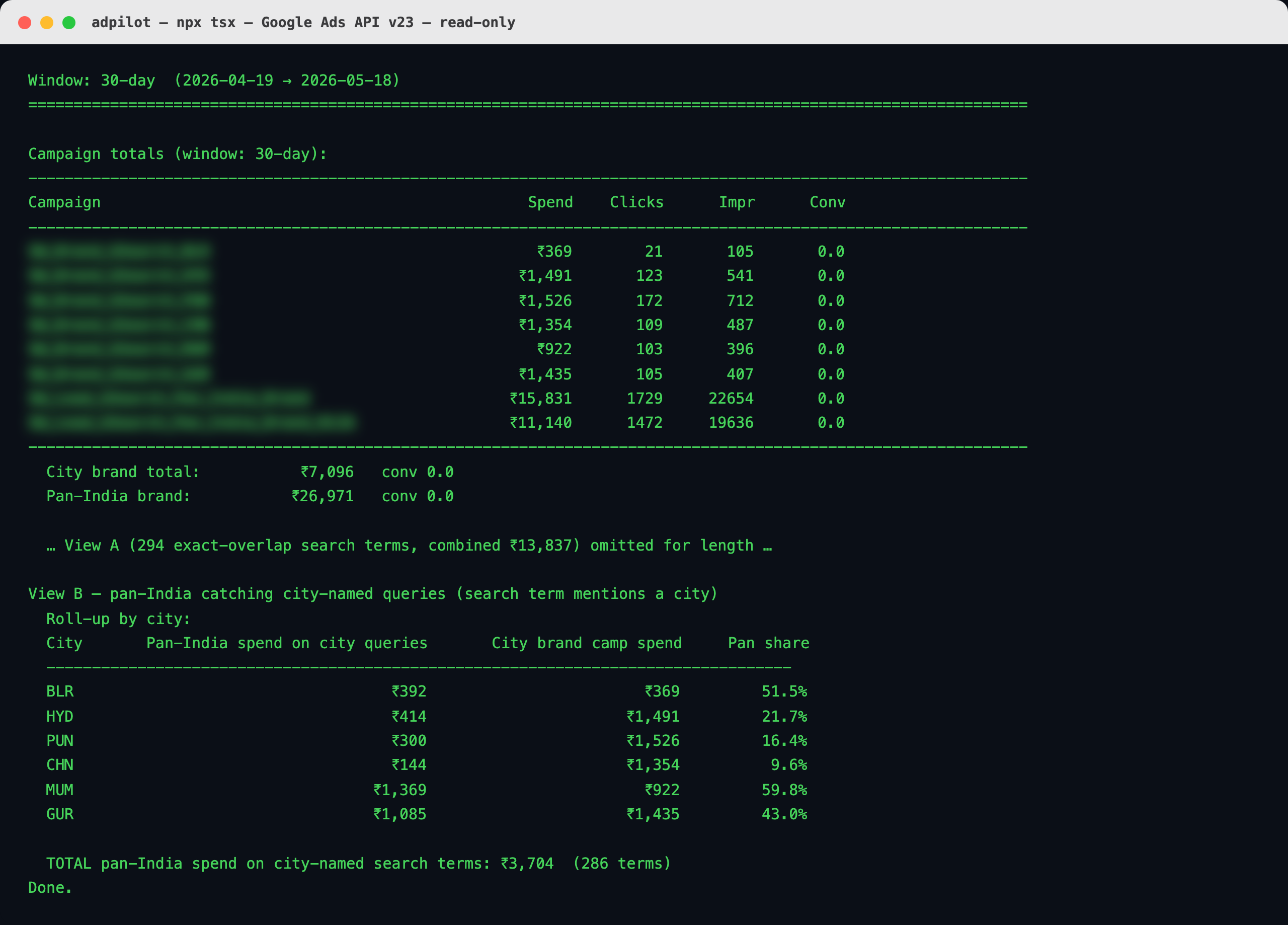
Real terminal output. Campaign names blurred, the spend and the overlap percentages are exactly as they ran. The long term-by-term table is elided in the screenshot, not in the run.
The reason that matters is that the list has no natural end. Anything I can describe about the accounts, the funnel or the money, a report, an investigation, an audience to build, a broken thing to repair, a change to live campaigns, is now about one sentence away. Those two were reads. Here is one a step further, where it does not just answer, it builds.
One evening I asked it to turn our junk leads into something the ad platforms could actually use. Not a report about them. A defence against paying to go and find more of them.
It went to the lead data and pulled every contact we had written off, the ones marked not connected, low requirement, junk, low budget, not picked, one thousand three hundred and ninety one of them, and built three audiences out of that pile. A Google Ads exclusion list, to keep those people out of campaign targeting. A Meta source audience of the same bad leads. And from that source, a Meta one to five percent lookalike, so Meta learns the shape of a lead we do not want and stops spending to find more like it. Each one labelled with exactly how it is meant to be used.

The real terminal. Audience names and IDs blurred, the rest is exactly as it ran.
Then it did the part that makes it stick. It wired the refresh into the daily pipeline as another step, so the lists rebuild themselves every day instead of going stale the moment I look away, committed the code with a message explaining why, and pushed it. Then it stopped and told me, in plain words, exactly what to do next: exclude the list in Google Ads campaign targeting, exclude the lookalike in the Meta ad set once Meta has finished building it over the next six to twenty four hours, optionally exclude the raw source too. It did not reach into the live accounts and change targeting itself. Building the audiences is work it can do. Pointing real campaigns at them is my call, and it left it mine. That same shape, ask in plain language, it builds and wires and documents, I decide what goes live, is the shape of almost everything I used to open the interface for.
The part a read-only connector cannot do
Everything above is a read or a build that hands back to me. The official assistant connectors that exist now, and the read-only bridges people install, stop roughly there. They pull spend, list audiences, describe campaigns. That is genuinely useful, and it is the easy half. The half that matters in ad operations is changing things, and changing the wrong thing costs real money the same afternoon.
My layer crosses that line on purpose, with a gate. I can ask it to plan a real structural change, not narrate one. Here it is working out how to split a single overloaded city campaign, brand and competitor and generic intent all tangled in one, into three clean campaigns: what moves where, how many keywords, what stays.
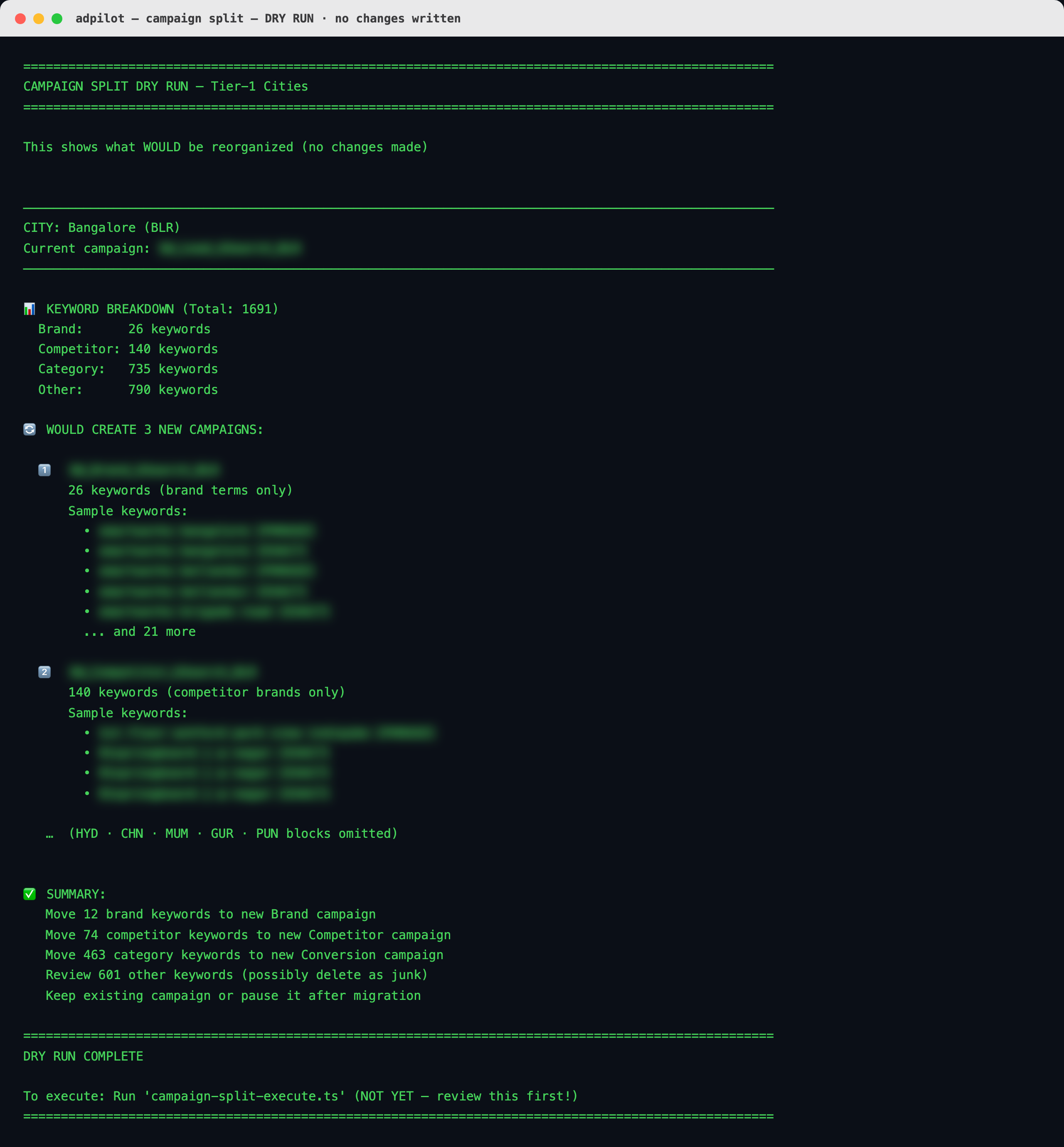
A real dry run. It computed the entire restructure against the live account and wrote nothing. Campaign names and sample keywords blurred, the counts and the plan exactly as produced. The last line is the point: it stops and waits for me.
That is the difference in one screenshot. A read-only connector cannot get here, because getting here means being able to mutate the account, and mutation without judgement is how budgets disappear. So the capability is a write, and the design is that it does the whole plan and then nothing. It shows me exactly what it would change, down to the keyword counts, and halts at the execute step with a line that amounts to: not yet, you look first. The gate is the architecture, not a missing feature.
When something does break, I can see it
Here is the other half of it, the day something broke.
We upload offline conversions back into Google Ads so the bidding learns from real sales, not just form fills. That means a click ID, the gclid, has to travel intact from the website, into the CRM, through an Excel sync, into a reporting Sheet, and finally into the conversion upload. Five hops.
Conversions were silently failing. In the Ads UI all you see is a number that is lower than it should be, with no screen that tells you why a conversion you never sent did not arrive.
From the terminal I could do the one thing that actually finds this class of bug: compare the gclid at every hop. Pull it from the CRM, pull the same lead from the reporting Sheet, put them side by side. That is a few lines of script.
What it found was two separate bugs. One was a URL fragment, a #section anchor, getting glued onto the end of the click ID because the parser split on the wrong character. The other was worse and quieter: the very first character of the click ID was being dropped somewhere in the Excel sync, so a perfectly valid ID arrived one character short and Google rejected it with a generic error that pointed nowhere.
Both were obvious the moment the data was something I could line up in a terminal and diff. The first one I fixed at the parser, pushed, and then repaired the historical rows directly through the Sheets API, hundreds of cells, in seconds, no manual editing. Then I re-fired the recoverable conversions by flipping a status flag and re running the upload function, again from the command line. Every step of that recovery would have been impossible, or a week of manual work, inside the UI.
That is the real argument for moving to the terminal. It is not that it is faster, though it is. It is that it makes the invisible visible. A pipeline you can query at every step is a pipeline you can actually trust.
The same move works for Meta and LinkedIn
None of this is specific to Google Ads. I lead with it because it was the worst offender, the account I was opening most often. But the moment the pattern existed, it spread on its own, because the pattern was never about Google. It was about not working inside an interface.
Meta works the same way. The same plain language asks, the same layer, a different API behind it. Spend, results, lead forms, and the deeper signal going back the other way through the Conversions API so the optimisation learns from real outcomes instead of form fills. I built that bridge too.
LinkedIn is the same story again with a different endpoint, its Marketing API feeding the same workflow.
Three platforms, three APIs, one way of working. That is what makes this feel less like a personal hack and more like where ad operations is going, a few years before it gets there.
What I would tell someone starting this
Be honest about the cost. There is a real learning curve, and for the first few weeks you will be slower, not faster, because you are building the road instead of driving on it. If your work is one account and you log in twice a week, the interface is fine, stay there, this is not for you.
Start with the thing you do every single day, not the impressive thing. For me that was the daily report. Automate the most repetitive, lowest judgement task first, because that is where the time actually leaks, and because a small win you feel every morning is what gives you the patience to do the next one.
Keep the code in git from day one, even when it is ugly. The value is not just the automation. It is that six months later you can ask, with git log and grep, what changed and why, and get a real answer. The Ads UI cannot answer that question. Your repo can.
And keep your tools small. The two helpers that changed everything for me are a few hundred lines each. You do not need a platform. You need to stop clicking the same buttons in the same order every morning.
I still open the Google Ads interface. Maybe once a week, to look at something visual, a placement, a creative preview, an audience overlap. It is a good place to look. It was a terrible place to work. Moving off it did not just save time. It changed what I could see, then what I could fix, then what I could ask for at all.
None of that came from the model. Everyone has the same models, so the model was never the advantage. The advantage is the layer underneath that makes a general assistant fluent in one specific business, and that has to be built by someone who knows the operation. The work is still mine and the judgement is still mine. What changed is that I stopped waiting for someone to build the way to do this, built it myself before the platforms did, and now the whole operation answers to a sentence.

Written by
Dan Antony
I have spent 11 years building marketing teams and infrastructure from scratch — from a $1.5M B2B SaaS budget to leading two brands across India and Singapore. I write about Meta Ads, Google Ads, SEO, and the MarTech stack that actually moves the needle.